Introducing AMD Ryzen 9 9950X CPUs in our Workstations
CAD Masters is thrilled to announce that all our workstations will now offer AMD processors as an alternative CPU. The AMD Ryzen 9 9950X is a cutting-edge processor that serves as an excellent alternative to the Intel i9-14900K, providing outstanding performance for CAD users. With 16 cores and 32 threads, the Ryzen 9 9950X ensures lightning-fast multitasking and exceptional productivity.
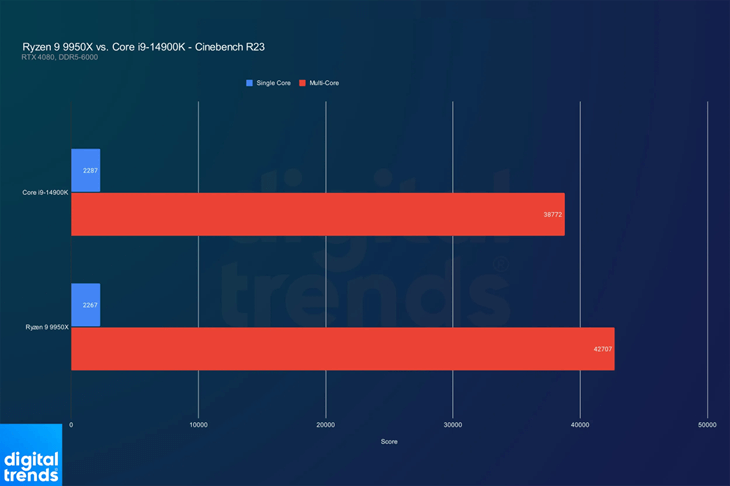
A benchmark test conducted by Digital Trends reveals a close performance comparison between the AMD Ryzen 9 9950X and the Intel i9-14900K. While the Ryzen 9 9950X outperforms the Intel CPU in multi-core tasks, the i9-14900K has a slight edge in single-core performance. Since Autodesk software relies more on single-core performance, this distinction is important for users focused on those applications. However, despite the i9-14900K’s advantage, the AMD Ryzen 9 9950X remains a strong alternative for CAD use, offering excellent performance that can meet the needs of many professionals.
CAD Masters Workstations
Our pre-configured CAD workstations are specifically tailored to meet the demands of every level of CAD work– from 2D drafting all the way to Lidar data processing, ensuring that you have the right tools to get the job done efficiently. And if you have specific requirements, our computer builder tool allows you to create a workstation that meets your exact needs.
With CAD Masters, you can trust that your workstation will be optimized for peak performance and productivity.
What Sets CAD Masters Apart?
Our workstations are meticulously crafted for optimal performance and seamless use. We handle it all for you, from BIOS optimization, TPM 2.0 support, memory-tested RAM all the way to a fully-loaded Windows installation, complete with removal of non-business-related apps. No secondary installs or updates required.
What Sets Us Apart:
Autodesk certified video cards and drivers
Thorough CPU throttling stress tests
Installation of Autodesk software and more
Plus, Enjoy These Perks:
Customizable and easily upgradeable workstations
Post-purchase support and a one-year warranty
Competitive pricing with top-tier components
In-house Autodesk software support
Hardware Optimization Guide
Our team of experts at CAD Masters has put together a comprehensive guide to help you optimize your CAD workstation for peak performance.
In this guide, you’ll discover:
• Best practices for selecting the right components for your Autodesk workstation
• Step-by-step instructions for optimizing and debloating Windows 11
• Insider tips for fine-tuning your workstation to eliminate performance bottlenecks
• The benefits of investing in a pre-configured CAD workstation from CAD Masters