Civil 3D Storm and Sanitary analysis
Civil 3D’s Storm and Sanitary Analysis (SSA) is a powerful, yet often underutilized, tool for engineers and designers working on infrastructure projects. It provides a robust, dynamic environment for modeling, analyzing, and designing storm and sanitary sewer systems. This blog post will explore the key features and benefits of using this integrated application.
What is Storm and Sanitary Analysis?
SSA is an extension of Autodesk Civil 3D, but it can also run as a standalone application. It provides a comprehensive solution for analyzing and designing complex hydraulic and hydrologic networks. This includes modeling storm sewer systems, sanitary sewer collection systems, and even complex open-channel systems. Unlike traditional methods that rely on static calculations, SSA allows for a dynamic analysis of how water flows through a system under various conditions, such as different rainfall events or population growth scenarios.
Key Features and Benefits
1. Integrated Workflow
The primary advantage of SSA is its seamless integration with Civil 3D. You can export a network directly from Civil 3D to SSA for analysis. Once the analysis is complete and you’ve made design adjustments, you can then import the results back into Civil 3D. This round-trip workflow ensures that your design model is always synchronized with your analysis, eliminating the need for manual data entry and reducing the risk of errors.
2. Hydrologic and Hydraulic Modeling
SSA offers a wide range of tools for both hydrologic and hydraulic modeling.
- Hydrology: You can define rainfall events using various methods, including rational method, hydrograph methods, and custom rainfall data. This allows you to accurately simulate runoff and its impact on your system.
- Hydraulics: The software can model everything from gravity-fed pipes to pump stations, culverts, and weirs. It can perform dynamic flow routing, which is crucial for understanding how a system will behave during peak flow events and for identifying potential flooding issues.
3. Design and Optimization
SSA isn’t just an analysis tool; it’s also a design aid. It can perform automated pipe sizing and invert elevations to meet user-defined criteria, such as minimum velocity or cover depth. This helps engineers quickly optimize their designs, ensuring the system is both functional and cost-effective. You can also analyze different scenarios and compare results to find the most efficient solution.
4. Reporting and Visualization
After running an analysis, SSA provides a wealth of data for reporting and visualization. You can generate detailed reports on flow rates, velocities, HGL (hydraulic grade line) profiles, and more. The software also offers graphical displays of your network, including profile views and animated flow simulations, which can be invaluable for communicating design intent to clients and stakeholders.
Getting Started with Civil 3D SSA
If you’re new to SSA, here are a few steps to get you started:
- Create a Pipe Network in Civil 3D: Start by laying out your storm or sanitary network in Civil 3D, including pipes, structures, and their basic properties.
- Draw Catchment Areas: You can draw polylines or create catchment boundaries from your finish ground surface.
- Select Surface:
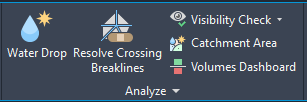
- Time of Concentration: You can use the waterdrop tool to draw a flow path for each catchment area or you can type in a user-defined time of concentration when defining each catchment in your catchment group.
- Select Surface:
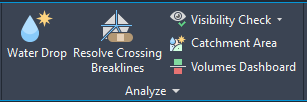
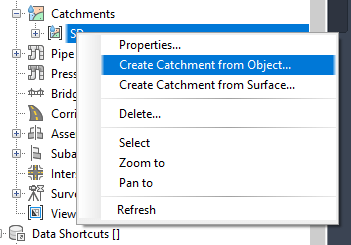
- Catchment Group: In Toolspace, Prospector Tab, right-click on Catchment to “Create Catchment Group”.Once you have named the group, right-click on the group name and “Create Catchment from Object or Surface”.
- Prospector Tab of Toolspace:
- Edit in SSA: Go to the Analyze Tab and click “Edit in Storm and Sanitary Analysis”. This will open your design in SSA with catchment data.
- Define Hydrology and Hydraulic Data: In SSA, you’ll need to define additional data, such as rainfall events, sub catchments, and any specific hydraulic structures like pumps or storage units.
- Project Options – Choose Calculation method (Rational? TR55?)
- Analysis Options – Choose Analysis period (1 day? 3 hours?)
- IDF Curves – Load or create .idfdb file with local storm data.

- Run the Analysis: Execute the analysis to simulate the flow through your network.

- Review and Adjust: Examine the results, paying close attention to areas with high velocities, surcharged pipes, or overflowing manholes. Make adjustments to pipe sizes, slopes, or other parameters as needed.
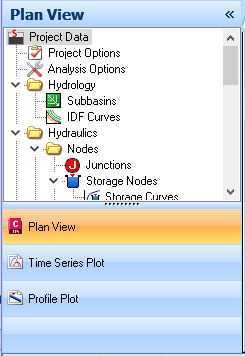
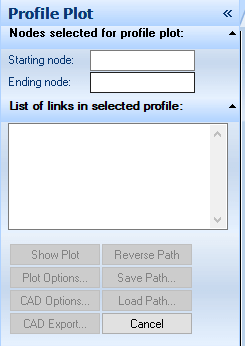
- Profile Plot – Click “Profile Plot” at bottom of Plan View panel (left side of SSA). Click in starting node field. Then select starting node in plan view. Click in ending node field. Then select ending node in plan view. Your pipe network should be highlighted in plan view. Next, click “Show Plot”.
- Output Animation – To see the water level in your pipes over time, go to Output Tab > Output Animation.

- Plan View – In plan view, pipes that need to be resized will be highlighted in red. To make any pipe adjustments, you can double click on a pipe and edit its properties.
- Export to Hydraflow Storm Sewers File: Once analysis and design are complete, go to File Tab > Export > Hydraflow Storm Sewers File.
- Import Back to Civil 3D: Back in Civil 3D, go to the Insert Tab and click “Storm Sewers” button to update your Civil 3D model with the new design parameters.
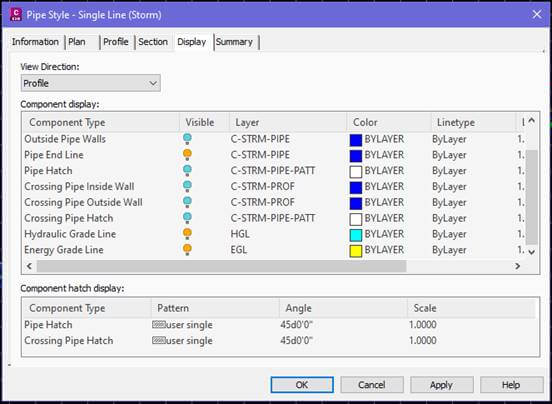
- Display HGL & EGL in profile view: Select pipe in profile view, right-click > Edit Pipe Style. On the Display Tab, set the view direction to “Profile”. Turn on Hydraulic Grade Line and Energy Grade Line.
By leveraging the power of Civil 3D Storm and Sanitary Analysis, engineers can create more accurate, efficient, and resilient designs for their infrastructure projects. It’s a valuable tool that streamlines the design process and helps in making informed decisions.
At CAD Masters, we offer hands-on Civil 3D training that covers everything from the fundamentals to advanced workflows—like Storm and Sanitary Analysis—so you can work smarter and deliver better designs faster. Whether you’re just starting out or refining your expertise, our experienced instructors will guide you through real-world projects and practical tips you can apply immediately.
Sign up for our upcoming Civil 3D classes today and start mastering the tools that will set you apart.