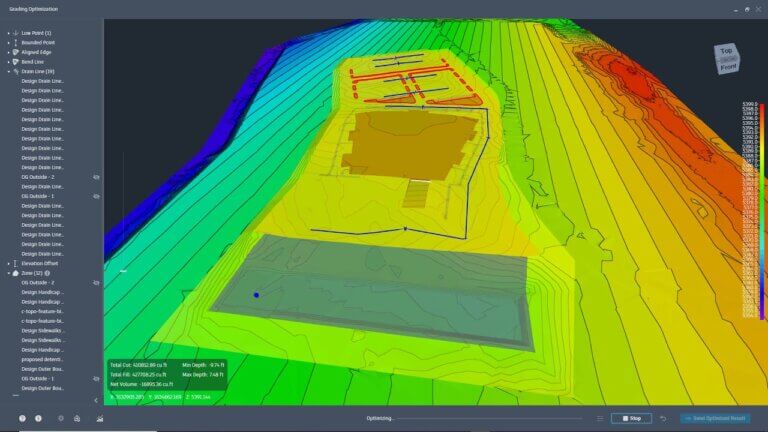
What’s New in Civil 3D 2026? Innovations That Streamline Your Workflow
Autodesk Civil 3D 2026, the latest release of Autodesk’s civil engineering software, brings exciting, user-driven enhancements designed to save time, improve collaboration, and enhance data precision.
Packed with cutting-edge features like the Drainage Analysis Technology Preview, 3D Model Viewer, and enhanced coordinate tools, it redefines how infrastructure projects are delivered.
This post unpacks the game-changing updates in Civil 3D 2026 and demonstrates how subscribing can transform your projects.
Key Features in Civil 3D 2026
1. Drainage Analysis Technology Preview
Drainage design becomes more connected with Drainage Analysis integrated into the Civil 3D environment. This feature enables you to connect Civil 3D drainage elements like pipes and catchments directly to advanced analytics tools via InfoDrainage, without requiring a separate installation.
Key Benefits:
- Simplifies pond, channel, and underground storage design with detailed analytics.
- Streamlines workflows by incorporating drainage analysis directly into Civil 3D projects.
- Allows cloud-based analysis and real-time results validation.
This technology is available as a preview, allowing users to shape its development through feedback.
2. 3D Model Viewer
Enhancing the visualization experience, the high-performance 3D Model Viewer provides civil engineers robust tools to review and adjust designs with unmatched clarity.
What It Offers:
- A modeless window for real-time 3D visualization within the design workspace.
- Immediate design change feedback for better collaboration and debugging.
- Customizable element toggles to focus on specifics within a complex project.
Consider this tool your shortcut to eliminating design uncertainties and gaining full visibility into intricate models.
3. Project Explorer Enhancements for Rail Modeling
Civil 3D 2026 steps up its support for rail projects with improvements to Project Explorer. Engineers now have new value inputs for managing rail curves based on Speed, Curvature, and Cant.
Why it’s Beneficial:
- Simplifies the review and validation of rail designs, even for highly complex layouts.
- Allows seamless export for reports or validation.
For any project requiring rail infrastructure, this feature drastically reduces unnecessary back-and-forth edits.
4. Coordinate Systems and Transformation Tools
Consistency in georeferenced data often determines project success. Civil 3D 2026 introduces enhanced coordinate system management and transformation tools that empower teams to maintain accuracy across all stages of a project.
Highlights:
- Add or adjust coordinate systems for entire drawings quickly.
- Seamlessly transform the coordinate system of selected objects.
- Minimize costly errors caused by misaligned geospatial data.
Whether you’re managing large infrastructure projects or smaller site developments, this enhancement ensures greater alignment and precision.
5. Surface Performance Enhancements
Handling large surfaces without lagging performance has always been a challenge. Civil 3D 2026 tackles this with data shortcuts and surface selection customization.
Key Features:
- Define an area of interest and reference only the required surface data.
- Reduce drawing sizes for complex projects without compromising performance.
These updates save enormous amounts of time while improving drawing navigation and load speeds.
6. Improved Workflows with My Insights
AI-powered assistance isn’t limited to automation and modeling anymore. Civil 3D 2026 introduces My Insights, an intelligence-driven analytics tool offering usage recommendations based on your workflow patterns.
For instance, if you frequently apply specific commands or methodologies, My Insights provides tips to optimize repetitive tasks, saving time and effort.
7. Enhanced Dynamo for Civil 3D
Regular users of Dynamo for Civil 3D will notice critical updates in version 2026. New nodes, such as the FeatureLine.ByPoints Node, simplify the creation of basic feature lines.
Key Advantages:
- Automates repetitive geometry tasks with precision.
- Provides updates tailored for professionals managing drainage systems and catchment groups.
8. Connected Design Reviews via Autodesk Construction Cloud (ACC)
Collaboration becomes seamless with Civil Tools in ACC. This integration brings models and issue tracking into a centralized platform accessible by all project stakeholders.
Top Features:
- Share and review infrastructure designs in real time with dispersed teams.
- Enhanced issue tracking and design validation tools improve communication.
For teams navigating complex infrastructure projects, these cloud-based tools simplify coordination and accelerate timelines.
Why Upgrade to Civil 3D 2026?
Civil 3D 2026 ensures civil engineering professionals have access to high-performance tools that drive productivity, reduce errors, and foster improved collaboration. A few things make this version of Civil 3D stand out from older versions or competitors in the market.
Efficiency First
With tools like targeted surface referencing and drainage analysis, Civil 3D enables smarter workflows that minimize time spent managing redundant data.
Precision Above All
From enhanced coordinate systems to rail-specific functionalities, every update guarantees greater accuracy, reducing both mistakes and rework.
Collaboration Simplified
Autodesk’s integration with ACC brings everyone on the same page, allowing faster, more productive discussions and better project outcomes.
Continuous Learning & Customization
Built-in resources like My Insights and Dynamo Nodes allow teams to continuously optimize their processes and tailor designs to project specifics.
Get Started with Civil 3D 2026
Eager to explore how these new tools can revolutionize your workflow? Subscribe to Civil 3D 2026 with CAD Masters. Experience innovative drainage analysis tools, intuitive design reviews, and enhanced coordinate systems today.
Still on the fence? Sign up for Autodesk’s What’s New in Civil 3D 2026 Webinar here. You’ll receive tons of information to help you fully understand these updates and how they can benefit your team.